Track less, but track every time
The temptation is to record everything — feeds, nappies, minutes awake. Most of it goes unused. Four things are enough to see patterns: when sleep started, when it ended, how many times your baby woke, and how the morning felt. Add the sound that was playing and you can compare nights properly.
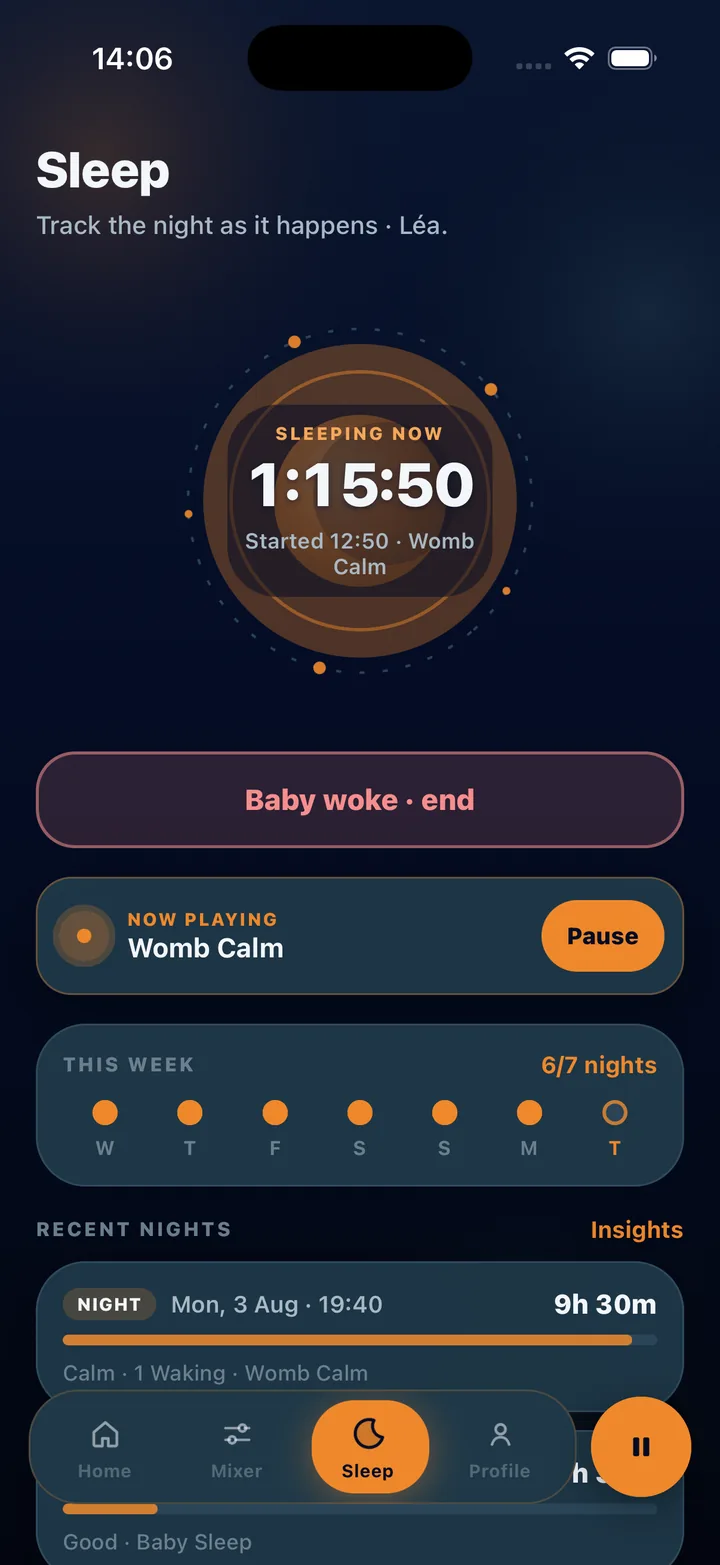
The app records the sound automatically because the log lives beside the player. You tap Start when your baby is down, tap again when they wake, and tap a mood in the morning. Naps use the same two taps, tagged separately.
What to look for after a week
The Sleep insights screen turns your logs into a few plain sentences:
- Average sleep stretch across the sessions you logged
- Wakings across the week, and how many nights had them
- The sound that lined up with longer stretches
- How mornings have felt, from your mood taps
Reading the results honestly
Seven nights is a small sample, and babies change week to week. Treat the insights as a nudge — “brown noise lined up with longer stretches” — and test it for another week rather than as a verdict. The insights are drawn only from your logs, stay on your device when you use the app as a guest, and are not medical advice.
This guide is general information for parents, not medical advice. Every baby is different; if you have concerns about your baby’s sleep, hearing or health, talk to a pediatric professional.
Steps
Two taps a night, one in the morning.
- Set up a baby profile
Add your baby’s name and birth date so logs and insights are kept per child. Guest mode keeps this on the device.
- Start the sound, then the night
Start your bedtime mix, open Sleep and tap Start night. The session records the mix that is playing.
- Log wakings as they happen
If your baby wakes, tap Baby woke. Use Rescue on Now Playing if they need a stronger settle, then continue or end the session.
- End in the morning and tap a mood
Tap to end the night and choose how your baby seemed. Duration, wakings, mood and sound are saved together.
- Log naps the same way
Switch to Nap on the Sleep screen and tap Start nap. Naps are tagged separately so they do not blur night totals.
- Read Sleep insights after a week
Open Sleep insights to see average stretch, wakings and which sound lined up with longer sleep. Adjust one thing and log another week.
Frequently asked questions
Do I have to log every night?
The more nights you log the clearer the picture, but even four or five nights a week will show which sounds line up with longer stretches.
Is my baby’s sleep data private?
Baby-related data is treated as sensitive. In guest mode it stays on your device; if you sign in to sync, there are no ads, no third-party ad SDKs and you can delete your account and data at any time.